Brand kit
Teach Kerpow how the brand talks, looks and shows off.
Where: Client → Brand
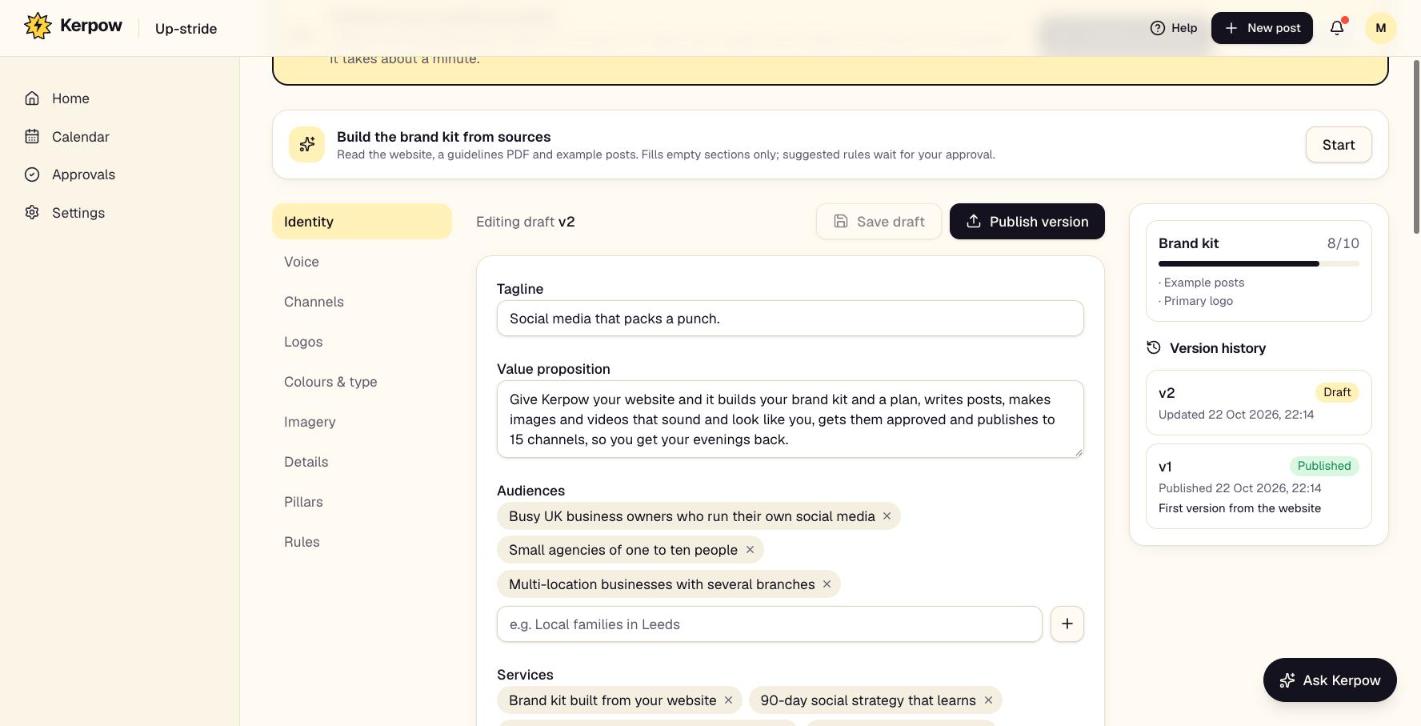
Everything Kerpow needs to sound and look like the brand: identity, voice, logos, colours, imagery, proof and products. Every post and image is made from this.
How to use it
- 1Press Start under Build the brand kit from sources to read the website (and an optional guidelines PDF or example posts).
- 2Go through each section on the left and correct anything that's off.
- 3Add real proof (case studies, reviews, numbers) and products with photos.
- 4Press Publish version. Kerpow uses the published version.
What's on this screen
Identity
Tagline, value proposition, audiences, services and key messages.
Voice
How formal and playful to be, words to use and avoid, emoji rules.
Logos
Logo versions for light and dark backgrounds and the profile picture.
Colours & type
Brand colours with their roles (background, text, accent) and fonts.
Imagery
What photos should show, and the default image style (for example Designed graphic).
Proof library
Real case studies, reviews, numbers and awards. Posts use one at a time, word for word.
Products and services
What they sell, with photos and prices. Posts name them exactly; photos can be used when making images.
Rules
Brand rules. Kerpow suggests new ones from approval feedback for you to approve.
Version history
Every published version, so you can see what changed.
Ready to make some noise?
Give Kerpow your website and get a brand kit, a plan and your first week of posts in minutes. 3 months free for our first 20 beta testers.